
Plan-view opening geometry
Rectangular Cutout Layout Checker
Set the top’s outer width and depth. Use its left-front corner as (0, 0), x to the right and y toward the back. Enter actual rectangular openings or explicitly identified rectangular envelopes in millimeters.
Enter measurements → review geometry or arithmetic → confirm the real application. No order or approval is generated.
Enter your records
Required inputs must be complete. Only fields marked optional may be left blank. Enter 0 only when zero is deliberate; missing values remain unresolved. Use non-confidential references only.
Record fields
- Outer top width along x (mm)
- Outer top depth along y (mm)
- Unique opening or envelope reference
- Opening left x (mm)
- Opening front y (mm)
- Opening width along x (mm)
- Opening depth along y (mm)
Reviewable result
Enter records to begin.
Worksheet processing stays in this page. Inputs are not uploaded or stored, and reloading clears them. Page analytics are disabled here. Contact links and the quote form are separate actions; review the result before choosing to share it.
Worked example
A buyer checks the planned openings on a vanity top before the drawing goes to the fabricator, with one faucet and one dispenser opening placed close together.
Example figures are invented for illustration. They are not product data, prices or a quotation.
Whole-worksheet settings
| Outer top width along x (mm) | 1200 |
|---|---|
| Outer top depth along y (mm) | 520 |
Example inputs
| Unique opening or envelope reference | Opening left x (mm) | Opening front y (mm) | Opening width along x (mm) | Opening depth along y (mm) |
|---|---|---|---|---|
| Basin envelope B1 | 100 | 60 | 500 | 400 |
| Faucet envelope F1 | 700 | 200 | 60 | 60 |
| Dispenser D1 | 740 | 240 | 80 | 80 |
Result from the worksheet
Rectangular Cutout Layout Checker

LOCAL WORKSHEET — entered data only

Basin envelope B1: left/right/front/back margins 100 / 600 / 60 / 60 mm.

Faucet envelope F1: left/right/front/back margins 700 / 440 / 200 / 260 mm.

Dispenser D1: left/right/front/back margins 740 / 380 / 240 / 200 mm.

Basin envelope B1 ↔ Faucet envelope F1: SEPARATE; separation 100 mm.

Basin envelope B1 ↔ Dispenser D1: SEPARATE; separation 140 mm.

Faucet envelope F1 ↔ Dispenser D1: OVERLAP; overlap area 400 mm².

REVIEW ITEMS

Faucet envelope F1 / Dispenser D1: OVERLAP

No product, inspection, installation, stock or delivery approval is generated.
How to read it
The top is 1200 by 520 mm. Faucet envelope F1 (x 700, width 60) and Dispenser D1 (x 740) overlap by 700 + 60 - 740 = 20 mm in x and by 20 mm in y, giving the 400 mm² overlap area. The basin envelope is separate from both. The buyer should move one opening or confirm a combined opening on the drawing; the tool checks rectangles only.
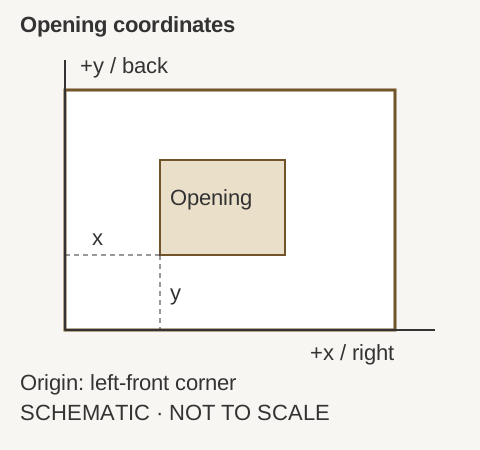
Four margins identify the opening position
Left = x; right = outer width − x − opening width; front = y; back = outer depth − y − opening depth. A negative margin means the entered rectangle extends beyond the top. Zero means boundary contact, not an adequate material bridge. Dimensions must be positive, while coordinates may be negative.
Pairwise rectangles are checked independently
A positive intersection in both axes means area overlap; equality at an edge or corner means contact. Otherwise the shortest distance between the two axis-aligned rectangles is reported, including diagonal separation. Containment counts as overlap. Duplicate opening references are rejected.
Geometry does not approve fabrication
A rectangle used as a basin’s bounding envelope is not its exact curved cutout. Radii, bevels, support, fabrication allowances, tolerances, material strength and manufacturer minimum bridges are not evaluated. Obtain the actual drawing and fabrication approval before using any spacing.
Numerical scope
Numeric inputs accept at most six decimal places and magnitude 1,000,000. Geometry contact and grid counts use exact scaled-integer comparisons within that input scope, not an added physical clearance. Displayed decimal results are rounded to six places and do not establish measurement accuracy.
Plan-view opening geometry questions
Does a zero edge margin count as a safe bridge?
No. It means the rectangle touches the top boundary.
How is one opening inside another reported?
As overlap.
Are touching corners ignored?
No. Corner contact is reported.
Can the tool assess the exact geometry of a curved basin opening?
No. It checks rectangles; a bounding envelope remains an approximation.
Does positive separation prove the top is strong enough?
No. Material and fabrication requirements remain separate.
Discuss the reviewed requirement
Use the result to identify questions for WNS Global. Offered products, specifications and commercial conditions still require separate confirmation.